10: Tool Use: From Saying Things to Doing Things
This is the tenth post in the “Understanding LLMs from First Principles” series. Post 09: RAG explained how external knowledge enters context so a model can move from “generated from impression” to “generated from evidence.” Now we take one step further: if a task is not just reading material, but checking inventory, calculating a refund, creating a calendar event, sending an email, or running code, how does a model move from “can say” to “can do”?
In the RAG post, we reached one important point:
RAG solves an evidence problem.
The retrieval system finds external material.
The language model organizes an answer from that material.
But many real tasks do not merely ask:
What does this document say?They ask:
Check the inventory for me.
Calculate this refund.
Create a meeting for next Wednesday.
Send the customer an email.
Run this code.
Continue editing based on the result.
The key is no longer only “knowing the answer.”
It is changing or querying the outside world.
That is where Tool Use begins.
From first principles, the most important sentence is:
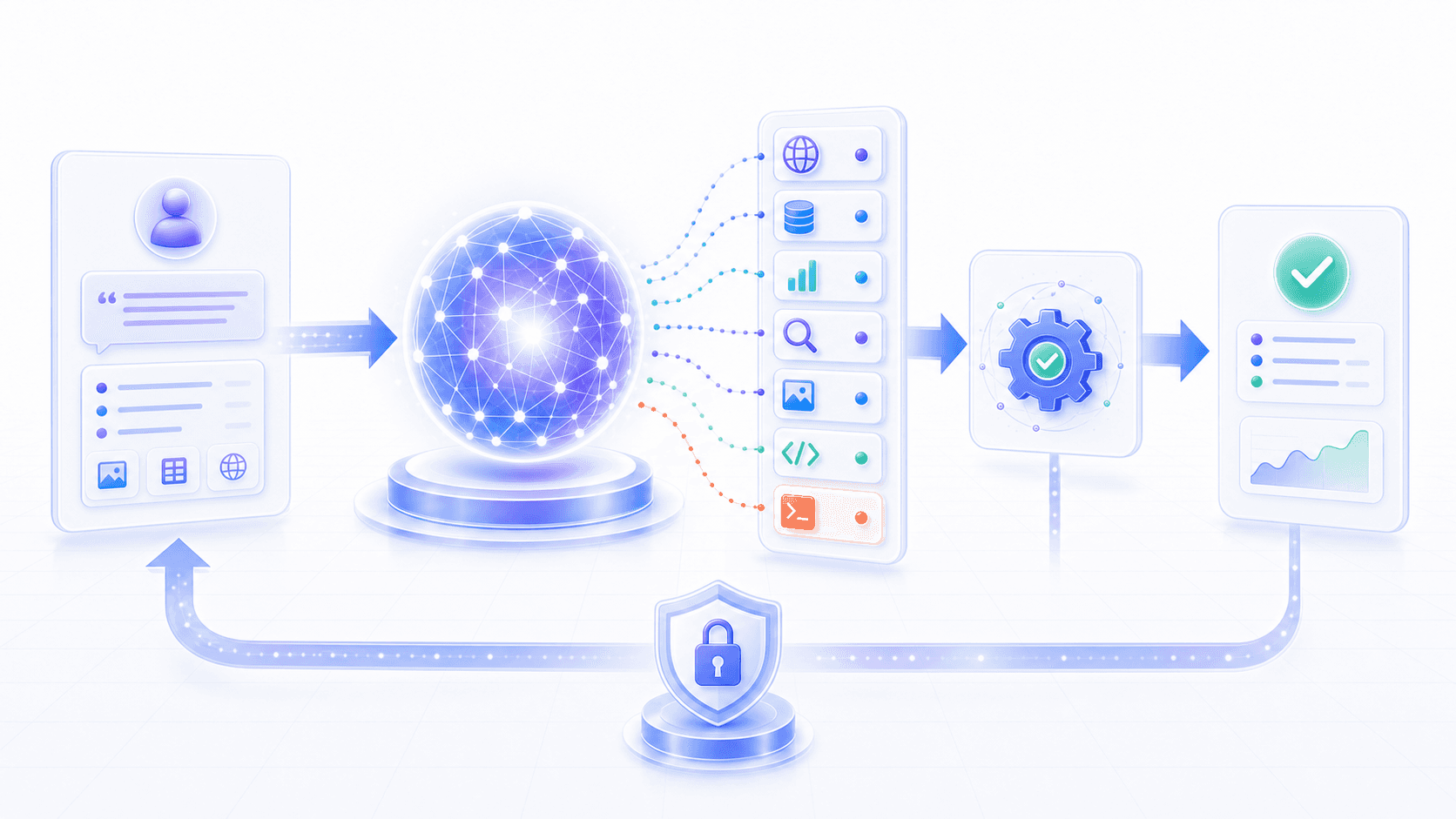
A model does not directly operate external systems. It generates a structured tool-call intent. An external runtime validates and executes that call, then returns the result to the model as new context.
This sentence explains the value of Tool Use, and also why it must be designed carefully.
1. Tool Use Solves “Cannot Act,” Not “Cannot Speak”
Many people first understand tool calling as:
Give the model a few plugins so it becomes more capable.That is close, but not precise enough.
More precisely:
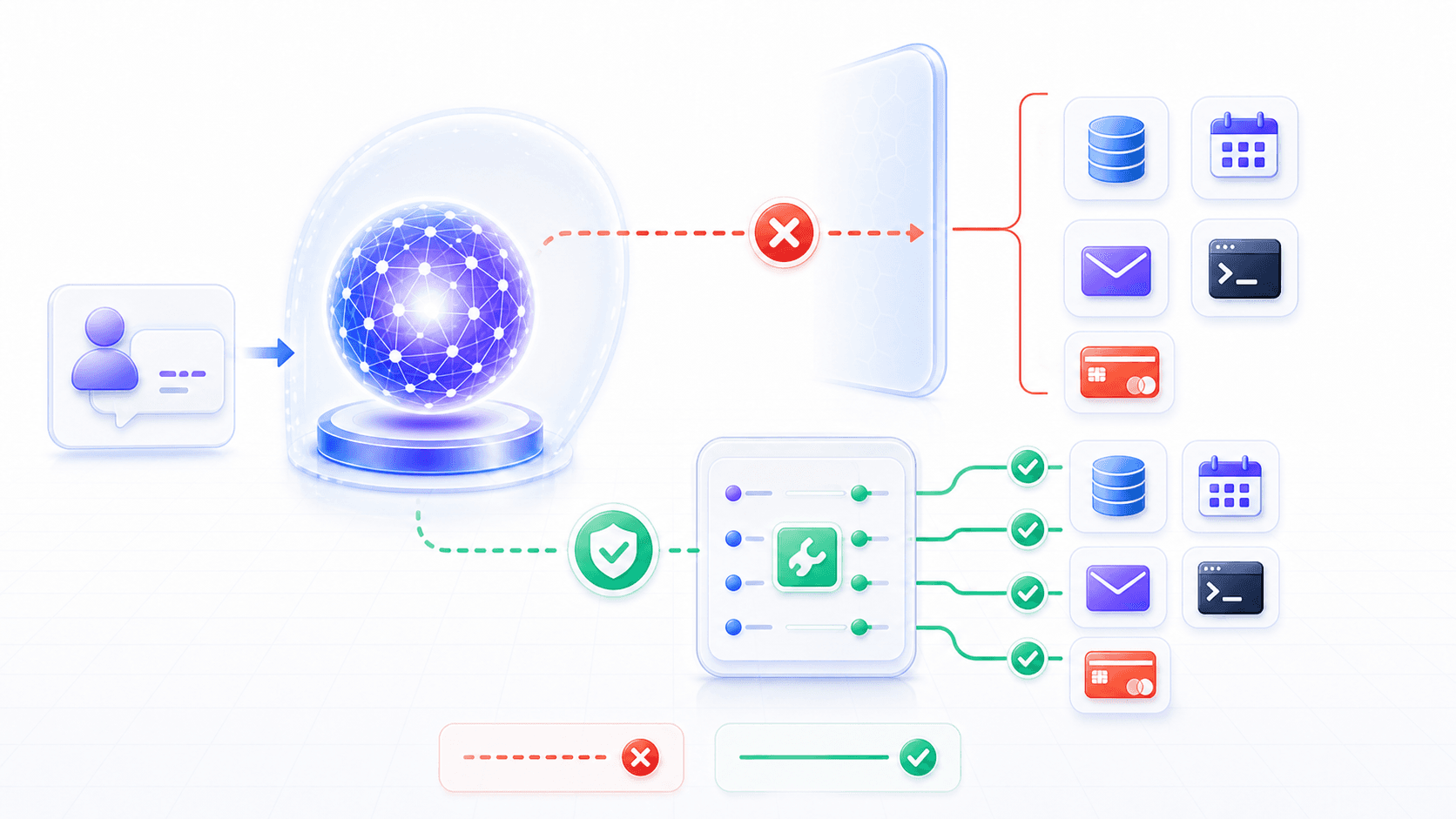
The model's native ability is token generation.
Tools read or change external systems.
Tool Use is the interface layer that turns token generation into external capability calls.
Suppose a user says:
Check how much inventory is left for SKU-1024.A raw model can generate a plausible answer:
SKU-1024 is currently well stocked.But that sentence has no real meaning.
The model parameters do not contain your company’s live inventory table.
Even if the model saw similar inventory systems during training, it does not know the value in that database row right now.
RAG can help it read documents, but inventory is not a static document.
Inventory is a changing business system.
So the model needs a tool:
{
  "tool": "get_inventory",
  "arguments": {
    "sku": "SKU-1024"
  }
}
The external system actually queries the inventory database and returns:
{
  "sku": "SKU-1024",
  "available": 37,
  "reserved": 8,
  "warehouse": "Shanghai-02"
}
Then the model answers from that result:
SKU-1024 currently has 37 sellable units, with another 8 units reserved. The data comes from the Shanghai-02 warehouse.What happened here is not “the model suddenly knows how to query a database.”
The responsibilities were separated:
The model understands the user intent and emits a tool call.
The runtime validates the call, executes the tool, and returns the result.
The model explains the result and continues the conversation.
That is the first principle of Tool Use.
2. Why Not Let the Model Do Things Directly?
A natural question follows:
If the model can write code and understand instructions,
why not let it connect directly to databases, send email, and change configuration?
Because the model is still a probabilistic generation system.
It is good at deciding what should be expressed next in context.
External actions require a different set of properties.
1. Actions Need Deterministic Interfaces
Inventory lookup cannot rely on natural-language guessing.
It needs a clear interface:
What is the function name?
Which parameters exist?
What types do they have?
Which fields are required?
What does the return value look like?
What errors can occur?
Natural language is flexible.
External systems are strict.
The first job of Tool Use is to compress a natural-language intent into a deterministic call structure.
2. Actions Need Permission
“Read a public help article” and “delete production data” are not the same kind of action.
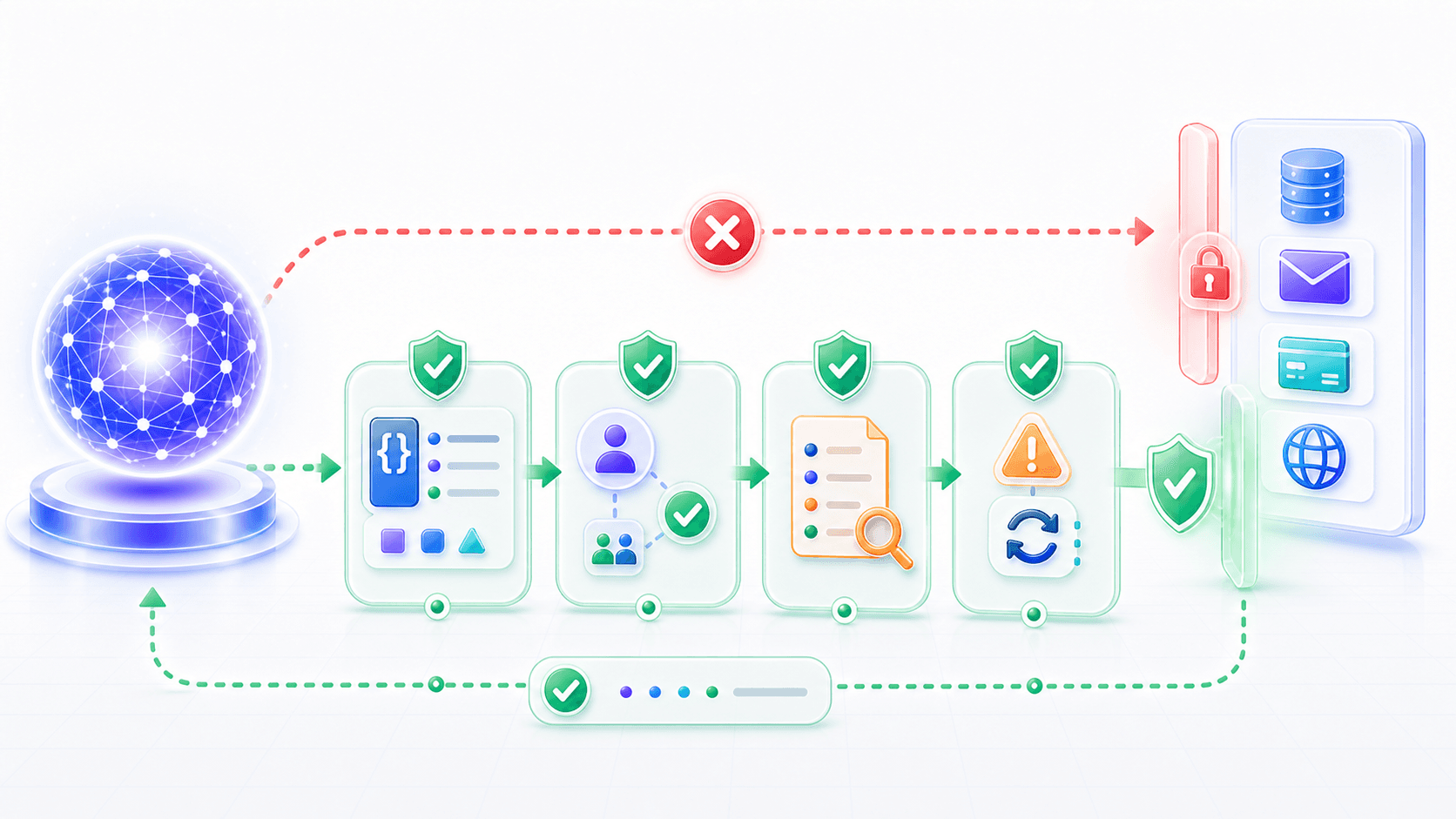
Whether a tool call can execute should not be decided by the model alone.
The system also needs to know:
Who is the current user?
Does the user have permission?
Is the action high risk?
Does it require a second confirmation?
Does it violate a safety policy?
Should the result be audited?
The model can propose a call.
Execution authority must belong to the external system.
3. Actions Need Traceability
If the system actually sends an email, creates an order, or changes configuration, the product must be able to answer:
Who triggered it?
Why did the model choose this tool?
What arguments were passed?
What did the tool return?
Did the user confirm it?
Was there a retry after failure?
Did the action produce side effects?
These are not language generation problems.
They are engineering governance problems.
4. Actions Need Failure Handling
Tool calls can fail.
A database may time out.
An API may return “permission denied.”
A calendar slot may conflict.
A payment tool may reject a transaction.
Without a clear error structure, the model can easily wrap failure in pleasant prose.
A usable Tool Use system must make failure part of the context too.
3. The Basic Loop: Intent, Call, Execution, Observation
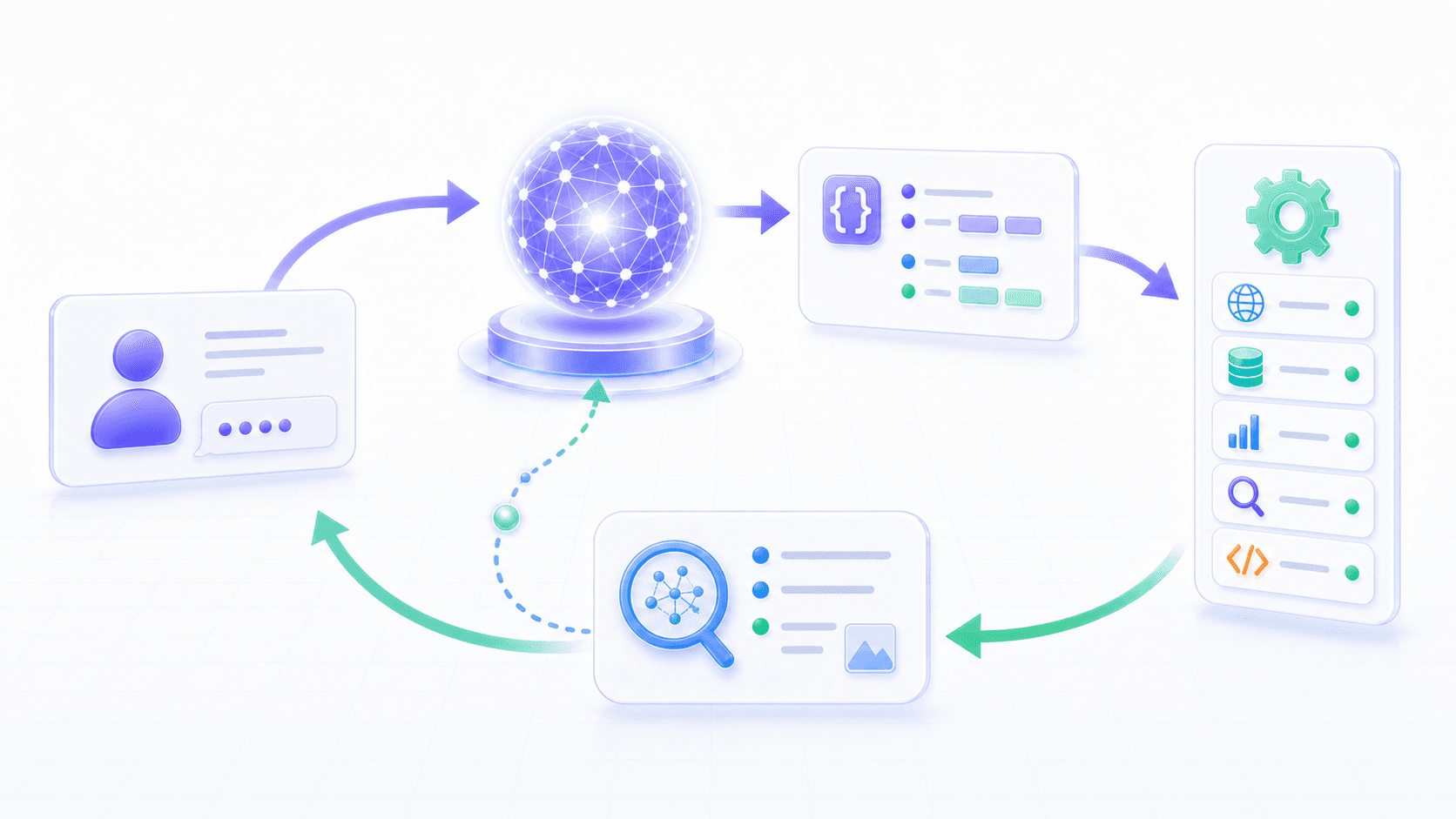
A basic tool-calling loop looks like this:
The user gives a task
↓
The model decides whether a tool is needed
↓
The model emits a structured tool call
↓
The runtime validates arguments and permissions
↓
The external tool executes
↓
The tool returns an observation
↓
The observation enters context
↓
The model continues answering, or emits another tool call
One word matters a lot here:
observationA tool result is not necessarily the final answer.
It is a new fact that the model can see in the next generation step.
Suppose a user says:
Schedule a 30-minute meeting with Alice tomorrow at 3 pm.The model may first call a calendar lookup tool:
{
  "tool": "list_calendar_events",
  "arguments": {
    "date": "2026-06-13",
    "start": "15:00",
    "end": "15:30",
    "participants": ["Alice"]
  }
}
The tool returns:
{
  "available": false,
  "conflict": {
    "title": "Weekly Review",
    "start": "15:00",
    "end": "16:00"
  }
}
After seeing that result, the model should not say “created.”
It should continue reasoning:
The requested time conflicts.
Ask the user whether to pick another time.
Or look for nearby free slots.
So it may call another tool:
{
  "tool": "find_free_slots",
  "arguments": {
    "date": "2026-06-13",
    "duration_minutes": 30,
    "participants": ["Alice"],
    "window": "afternoon"
  }
}
After the tool returns available slots, the model asks the user to confirm.
This is the key difference between Tool Use and ordinary question answering:
The model does not generate one answer all at once.
It alternates between emitting calls and reading observations.
4. Tool Schema: The Contract Between Language and the World
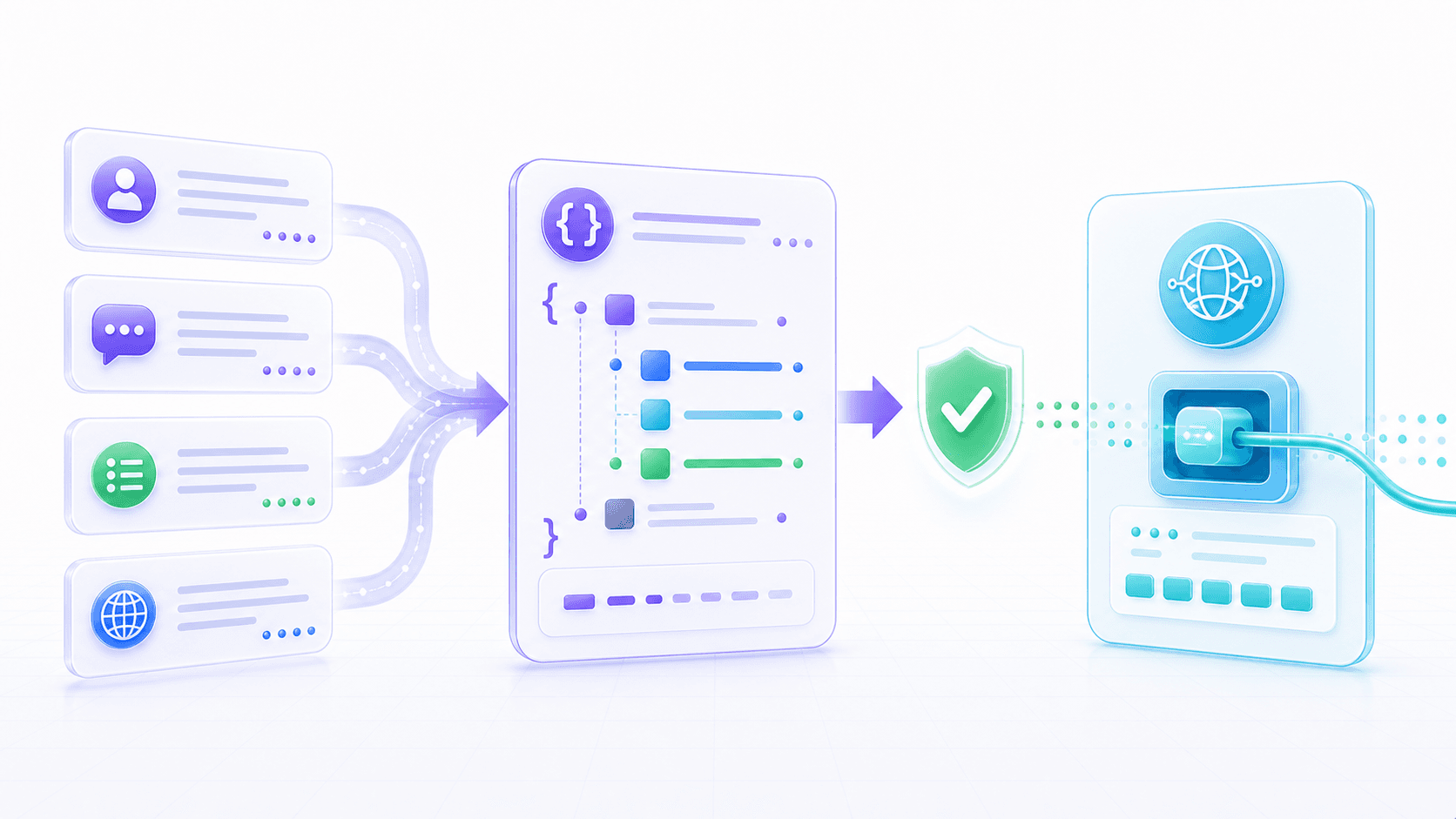
A tool is not just arbitrary code exposed to the model.
At minimum, a tool should be described like this:
{
  "name": "create_calendar_event",
  "description": "Create a calendar event after the user confirms the time and participants.",
  "parameters": {
    "title": "string",
    "start_time": "datetime",
    "end_time": "datetime",
    "participants": "string[]",
    "location": "string | null"
  }
}
This description is the tool schema.
It is a contract between the model and the external world.
Through the schema, the model knows:
Which tools are available.
What each tool is for.
Which arguments it should provide.
Which arguments it should not provide.
What the result roughly looks like.
Through the schema, the runtime knows:
Whether the generated arguments are valid.
Whether missing fields should be rejected.
How type errors should be reported.
Whether high-risk fields require extra confirmation.
Without a schema, the model can only say in natural language:
I want to create a meeting, probably tomorrow at 3 pm.With a schema, it can emit:
{
  "tool": "create_calendar_event",
  "arguments": {
    "title": "Meeting with Alice",
    "start_time": "2026-06-13T15:00:00+08:00",
    "end_time": "2026-06-13T15:30:00+08:00",
    "participants": ["alice@example.com"],
    "location": null
  }
}
This step is crucial.
It turns a fuzzy language intent into a data structure that software can validate and execute.
So Tool Use is not just “can the model write the right sentence?”
It is:
Can the model choose the right tool in this context?
Can it map user intent to the right arguments?
Can the system validate, execute, and trace that call?
5. Tool Selection: The Model Decides Intent, the System Controls Boundaries
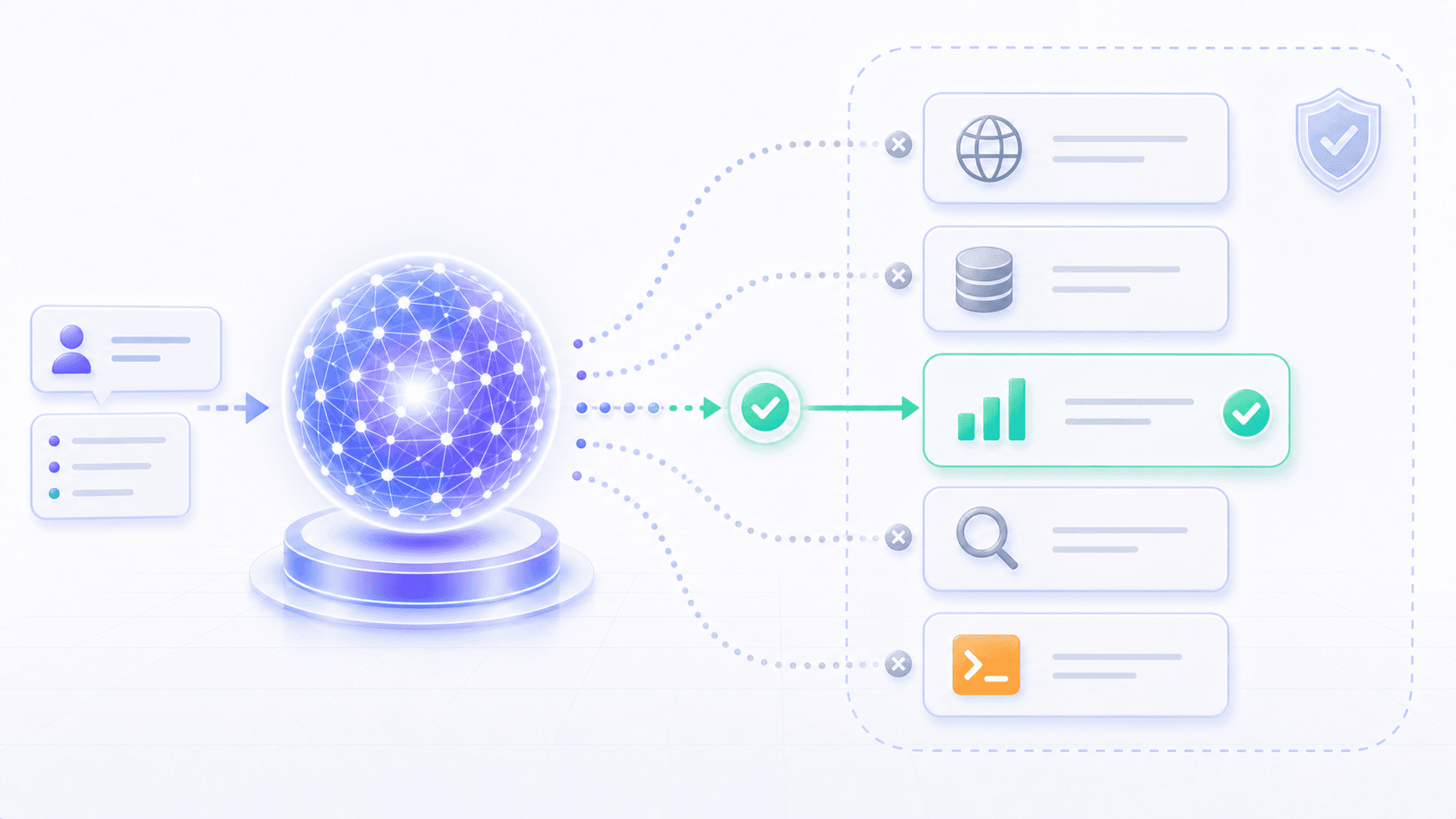
Tool calling hides an easy-to-miss question:
Who decides which tool to use?The simplest mode is to let the model decide.
If the user says “check inventory,” the model chooses get_inventory.
If the user says “send an email,” the model chooses send_email.
If the user says “run this code,” the model chooses run_code.
In real products, though, this is rarely left completely open.
The system participates in control:
Some tools are only available on certain pages.
Some tools are visible only to certain roles.
Some tools must read before they write.
Some tools can only be forced by a workflow.
Some tools must be disabled in high-risk contexts.
For example, a user says:
Cancel this customer's order for me.The model may understand that it needs:
cancel_orderBut the system should not execute immediately.
A safer path is:
First call get_order_detail.
Check whether the order can be canceled.
Preview the impact of cancellation.
Ask the user for explicit confirmation.
Then call cancel_order.
Record an operation log.
In other words, the model can propose “what may need to happen next.”
The system must define “which steps must happen.”
Good Tool Use does not hand all control to the model. It creates a clean division of labor between model capability and system constraints.
6. Read Tools and Write Tools Have Different Risk
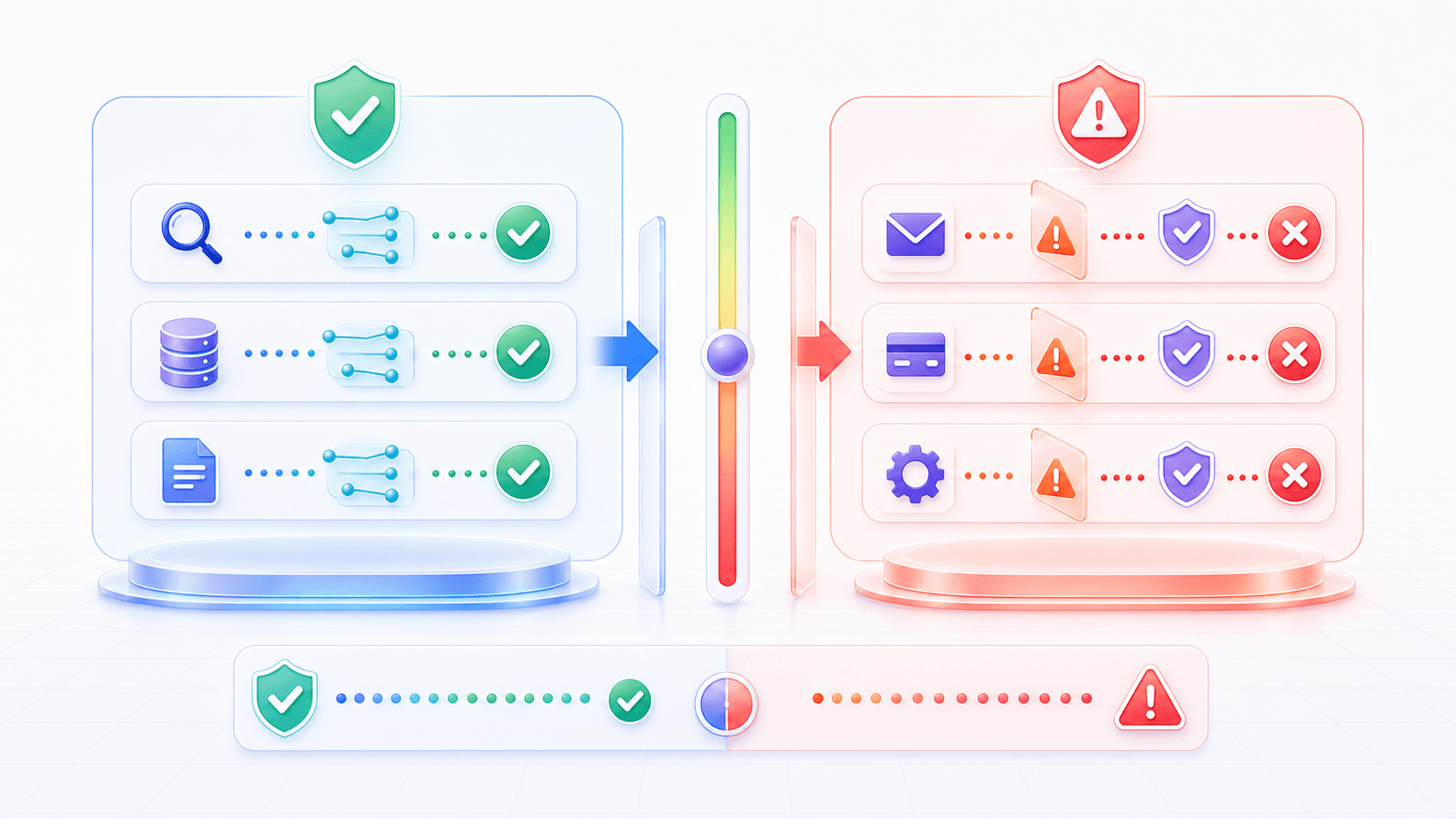
Not all tools are equally dangerous.
We can start by separating tools into two groups.
The first group is read tools:
Search documents.
Read a database.
Query a calendar.
Fetch order details.
Run read-only analysis.
Read the current file.
Read tools mainly change what the model can see.
They are usually lower risk, though they still require permission and privacy controls.
The second group is write tools:
Send an email.
Create an order.
Cancel an order.
Change configuration.
Delete a file.
Submit code.
Initiate payment.
Write tools change the outside world.
They have side effects.
Once executed, they may not be easy to undo.
So a tool-calling system should have risk tiers:
Low-risk reads: can run automatically, with permission filtering.
Medium-risk writes: show a summary and require user confirmation.
High-risk actions: require strict validation, approval, rate limits, audit, or may be disallowed entirely.
This explains why many AI products first support “help me read, organize, and look up.”
Read tools are easier to make trustworthy.
The hard part is “help me edit, send, pay, or delete.”
Those are not only model-capability problems.
They are product-responsibility problems.
7. Permission Boundaries: The Model Does Not Own the User’s Authority
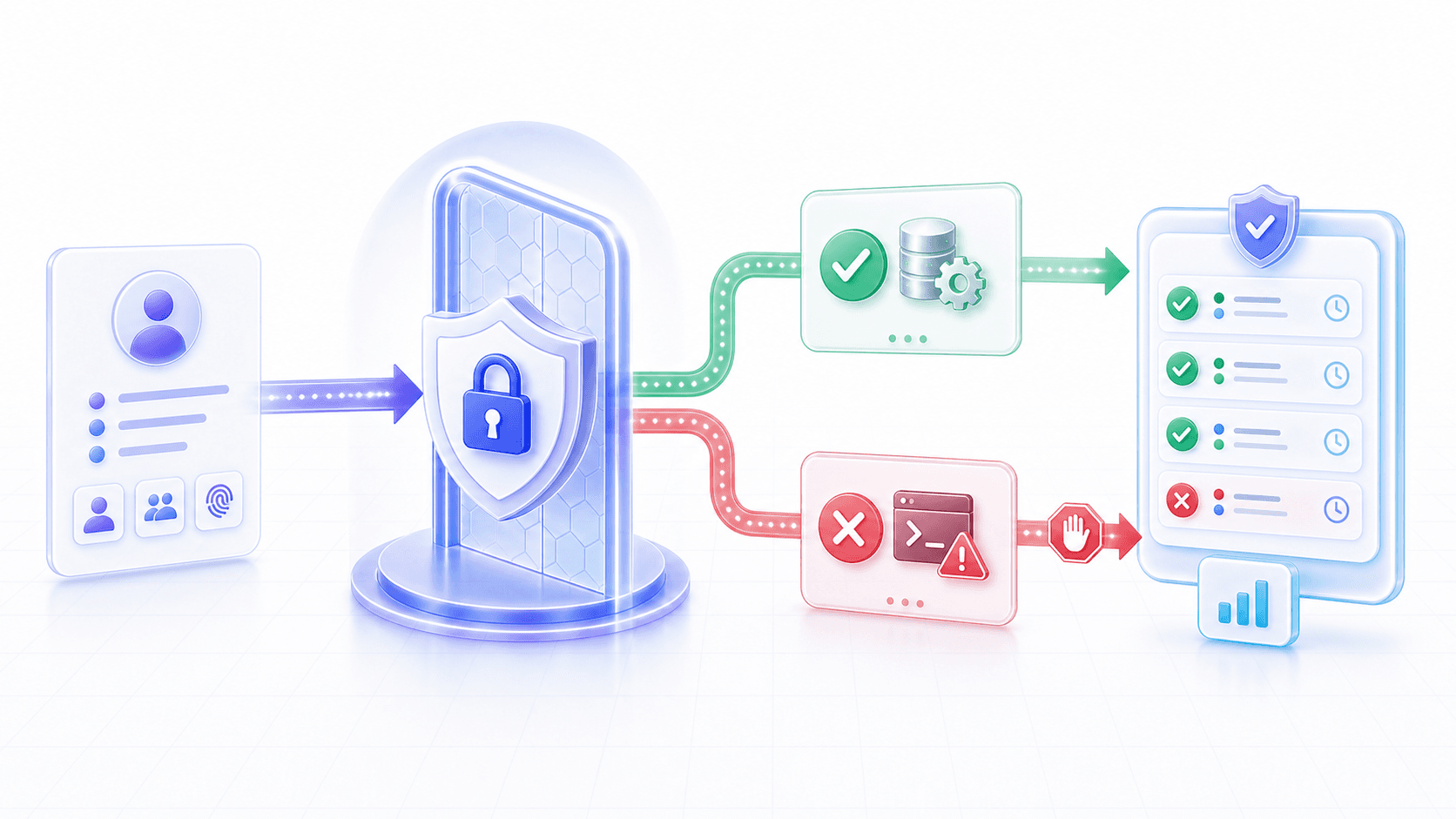
Tool Use must preserve one principle:
The model cannot gain permissions from nowhere.If the user cannot view a document, the model should not be able to see it through a tool.
If the user cannot cancel an order, the model should not cancel it for the user.
If an action requires a second confirmation, the model cannot skip that step.
This sounds obvious, but AI systems can easily blur it.
The model may speak fluently:
I understand your request. I will handle it for you.But linguistic “understanding” is not system “authorization.”
The tool runtime must independently check, outside the model:
User identity.
Organization and workspace permission.
Resource-level permission.
Action-level permission.
Rate limits.
Sensitive-field redaction.
High-risk action confirmation.
Audit logs.
From a product perspective, permission boundaries should not be invisible.
The user should be able to see key actions:
Which tool the model is about to call.
What object it will read or change.
What impact it may have.
Whether confirmation is required.
Why a call failed.
Tool Use lets a model do things.
Permission boundaries decide whether it can do those things safely.
8. Tool Results Enter Context: Observation Is Evidence Too
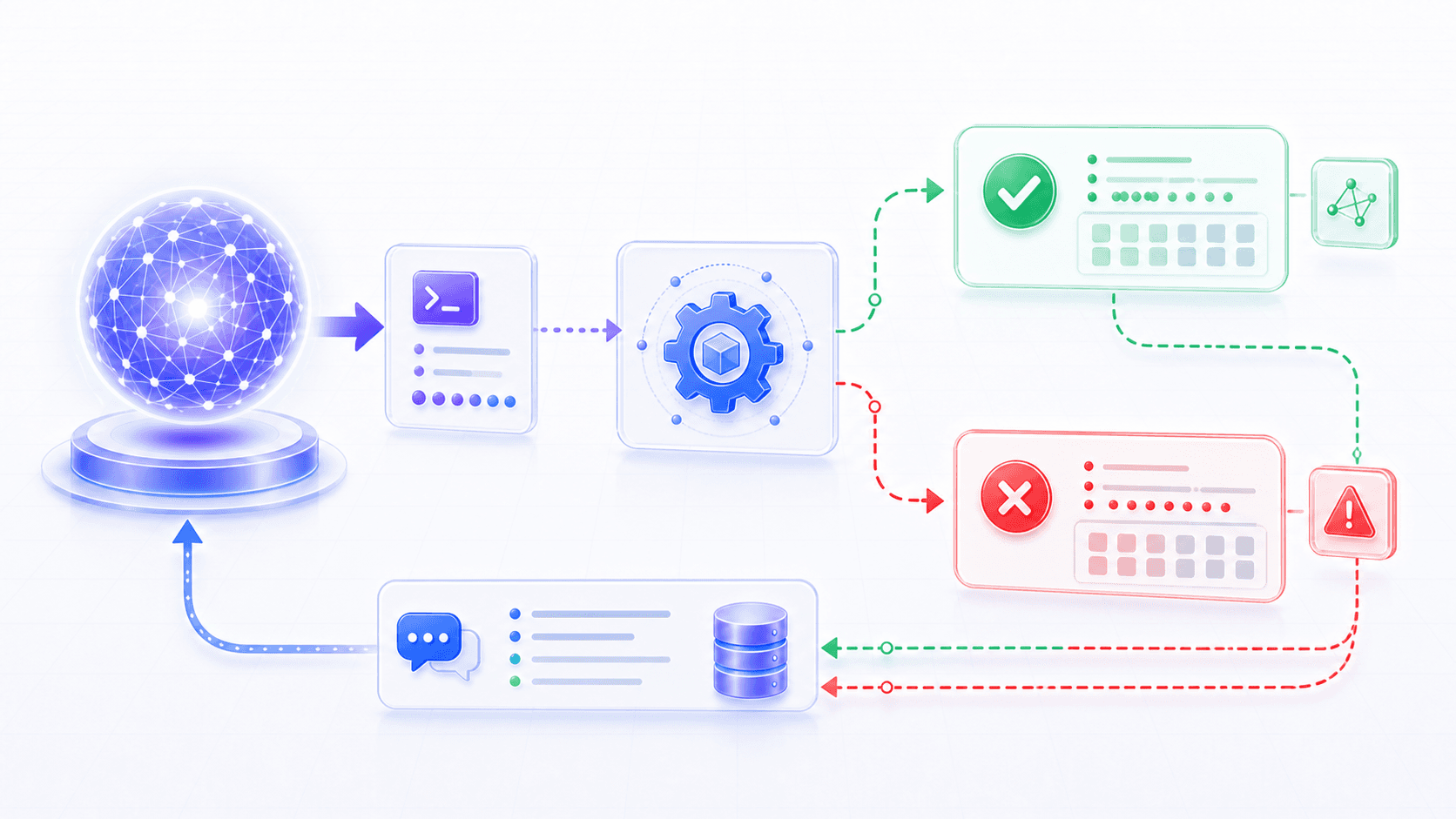
After a tool executes, the system returns a result to the model.
That result is often called an observation.
An observation can be success:
{
  "status": "success",
  "event_id": "evt_20260613_1530",
  "message": "Calendar event created."
}
It can also be failure:
{
  "status": "error",
  "code": "TIME_CONFLICT",
  "message": "The selected time overlaps with another event.",
  "suggested_next_step": "Find another available slot."
}
For the model, an observation is similar to a document chunk retrieved by RAG.
Both are external facts that enter context.
The difference is:
RAG evidence usually comes from external knowledge.
Tool observations come from concrete execution.
So tool results should be structured enough.
Do not only return:
Failed.Return:
Why it failed.
Whether it can be retried.
Whether alternatives exist.
Whether partial results were produced.
What the user needs to know.
Whether the next step is still safe.
This strongly affects the model’s next behavior.
If an error is vague, the model may fill gaps.
If an error is clear, the model can explain the problem, ask for confirmation, or choose a better next step.
9. Tool Use vs. RAG
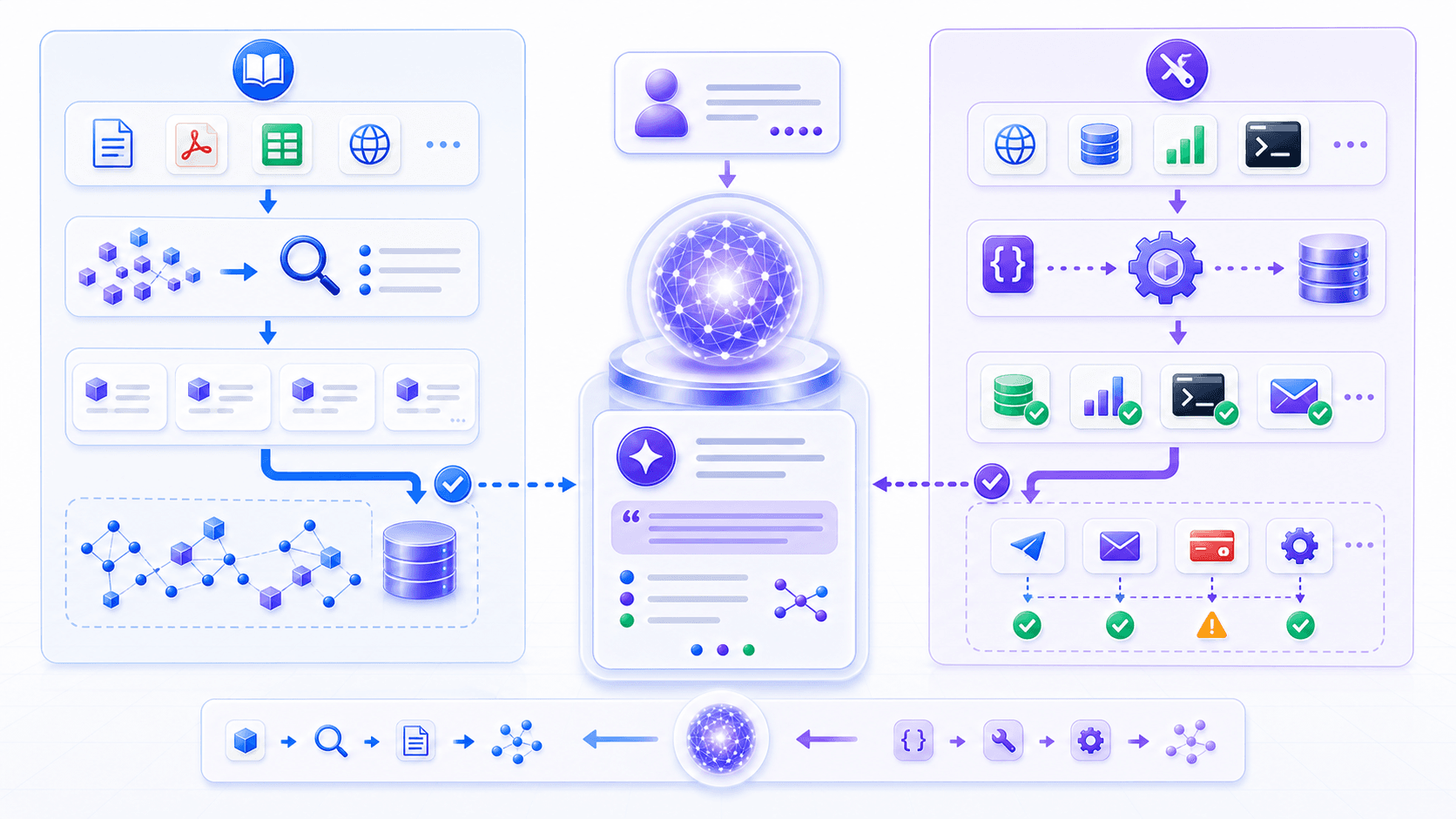
RAG and Tool Use often appear together.
But they solve different problems.
The core of RAG is:
Retrieve external knowledge and place it into context.The core of Tool Use is:
Turn model intent into external system calls, then return execution results to context.We can separate them like this:
| Capability | RAG | Tool Use |
|---|---|---|
| Main goal | Find evidence | Perform actions |
| External object | Documents, knowledge bases, web pages, files | APIs, databases, code runners, business systems |
| Typical output | Relevant passages, citations, evidence | Query results, execution results, errors, state changes |
| Changes the outside world? | Usually no | Sometimes yes |
| Main risk | Wrong retrieval, stale evidence, inaccurate citation | Wrong arguments, wrong permission, side effects, irreversible action |
| Product focus | Trustworthy sources, complete evidence, context assembly | Schema, permissions, confirmation, audit, rollback |
In real systems, the two are often combined.
For an enterprise support assistant:
First use RAG to retrieve the refund policy.
Then use an order lookup tool to read the user's order status.
Then decide whether the order satisfies the policy.
If it does, call a refund-request tool.
Finally explain the policy evidence, order status, and operation result together.
At that point, the model is not just “chatting.”
It is collaborating inside a system made of knowledge, tools, permissions, and workflows.
10. Product and Engineering: Tools Are Capability Boundaries, Not Button Collections
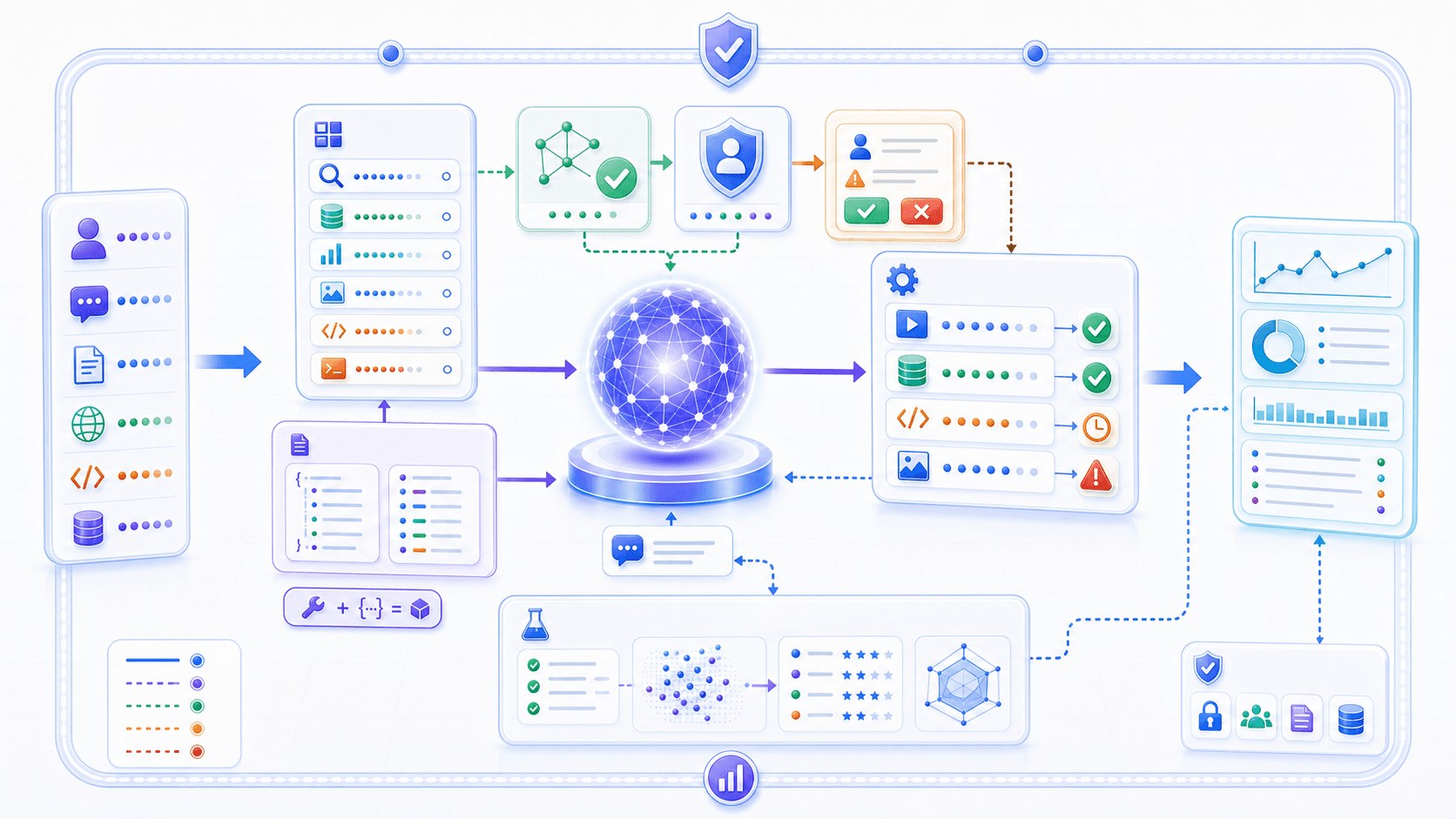
A common mistake in Tool Use products is:
Expose all existing APIs to the model.That is dangerous.
APIs are for programmers.
Tools are for the model and the product flow to use together.
They should not be treated as the same thing.
A good tool needs design at several layers.
1. Tool Granularity
If tools are too small, the model must combine too many steps and can easily drift.
If tools are too large, the system cannot control risk and users cannot see what happened.
For example, “cancel order” may not be a good raw tool.
A better design might be:
get_order_detail
check_cancel_eligibility
preview_cancel_impact
cancel_order_after_confirmation
This lets the system add validation and confirmation at each step.
2. Argument Design
Arguments should be close to user intent, not close to database internals.
Asking the model to pass:
order_id
reason
confirmed_by_user
is usually safer than asking it to pass many internal state fields.
The closer arguments are to internal implementation, the easier they are for the model to fill incorrectly.
3. Return Value Design
Return values are not random logs for machines.
They enter model context and shape the next generation step.
So return values should clearly express:
Current state.
Key fields.
User-visible summary.
Error reason.
Suggested next step.
Whether confirmation is required.
Whether side effects occurred.
4. Observability
Without observability, tool calls are hard to debug.
At minimum, the system should record:
User request.
Tool selected by the model.
Generated arguments.
Argument validation result.
Permission check result.
Tool execution latency.
Tool return value.
Final answer.
User feedback.
Otherwise, you only see “the AI made a mistake” without knowing whether the mistake came from intent understanding, tool selection, argument generation, permission checking, API execution, or result interpretation.
5. Evaluation
Tool Use evaluation cannot only ask whether the final answer sounds right.
It should also ask:
Did the model call a tool when it should?
Did it avoid calling a tool when it should not?
Did it choose the right tool?
Were the arguments correct?
Did it respect permission and confirmation?
Did it handle failure correctly?
Was the final answer faithful to the tool result?
This is closer to end-to-end product testing than ordinary text evaluation.
11. Common Misunderstandings

Misunderstanding 1: Tool Use means giving the model internet access.
No. Internet access is only one possible tool. A tool can be search, a database, a calendar, a code runner, a payment system, or local file access.
Misunderstanding 2: Once the model uses tools, it will stop making mistakes.
No. The model can choose the wrong tool, fill wrong arguments, or misread a result. The tool can also fail, time out, or return bad data.
Misunderstanding 3: Exposing every API gives the model the most capability.
No. More tools increase the selection space and raise the risk of wrong calls. Tools need design, tiers, permission limits, and evaluation.
Misunderstanding 4: Tool calls can bypass product flow.
They should not. Tool Use should obey product permission, confirmation, audit, and risk controls instead of bypassing them.
Misunderstanding 5: Tool Use is the same as Agent.
Not quite. Tool Use gives the model the ability to execute one external action or a short loop. An Agent is a longer-running system that plans, remembers, calls tools, observes results, adjusts strategy, and completes tasks over time.
Misunderstanding 6: Whatever the tool returns, the model will faithfully say.
Not necessarily. The model can ignore, misread, or over-interpret tool results. Result format, system instructions, evaluation, and validation all matter.
12. Summary: Tool Use Connects Intent to the Outside World
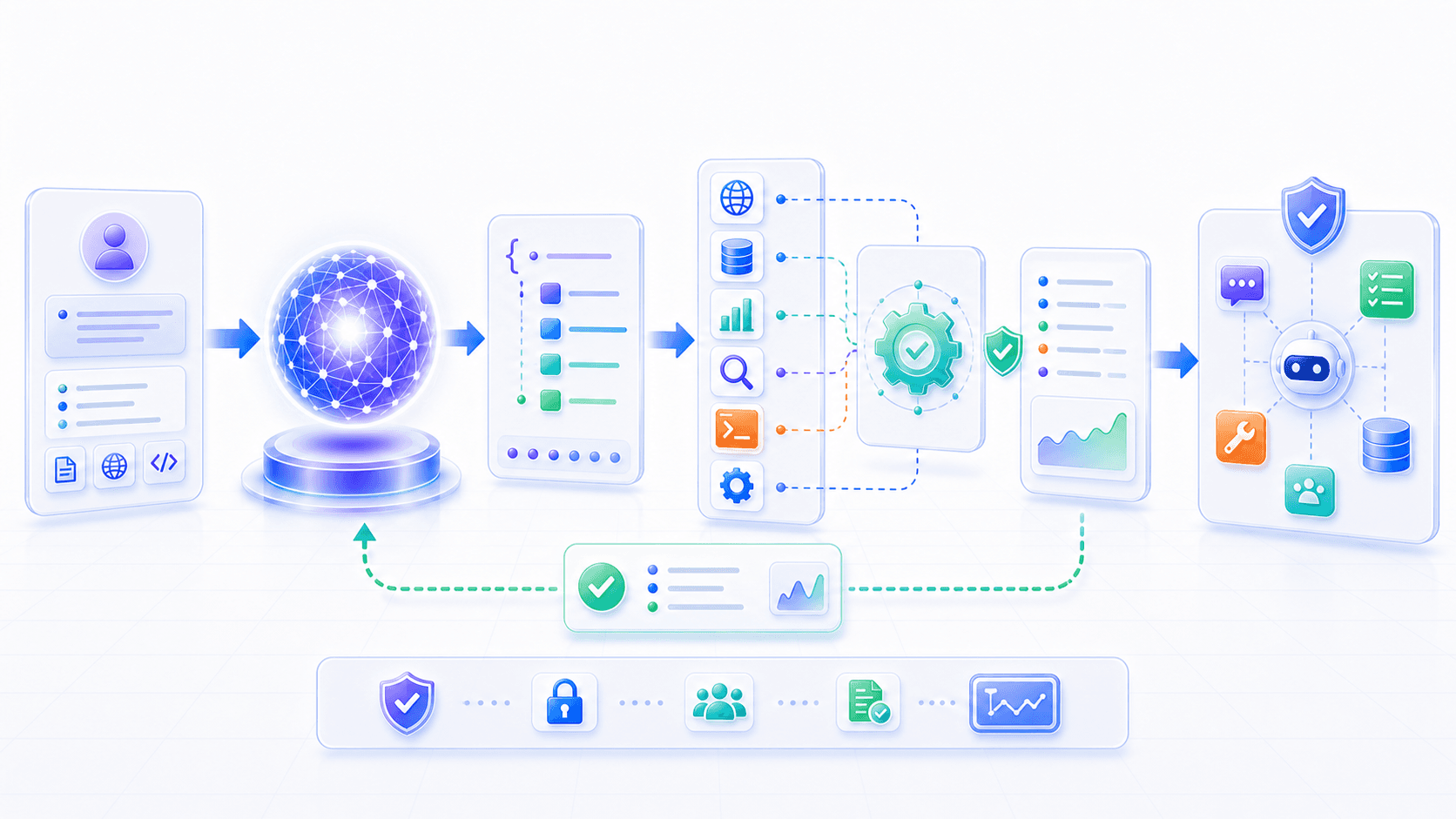
We can compress this post into a few sentences:
The model's native ability is token generation, not direct operation of the outside world.
Tool Use turns user intent into structured tool calls.
Tool schema is the contract between language and external systems.
The runtime validates arguments, checks permissions, executes calls, and records audit data.
Tool results return to context as observations and shape the next model step.
Read tools and write tools have different risk; write tools need confirmation and controls.
RAG mainly solves the evidence problem; Tool Use mainly solves the action problem.
Compressed into one sentence:
Tool Use lets a model connect language intent to external systems in a structured, verifiable, permission-bound way.
After understanding Tool Use, modern AI products become easier to see clearly:
The raw model understands and generates.
RAG brings evidence in.
Tools send actions out.
Permissions and workflows keep those actions controlled.
Observations return to model context and drive the next step.
This is no longer just a chatbot.
But it is not a complete Agent yet.
An Agent is not merely “calling a tool once.” It must operate over a longer horizon:
Decompose the goal.
Plan steps.
Choose tools.
Read results.
Revise the plan.
Handle failures.
Continue making progress.
Finish the task.
Next, we will look at Agents: how models move from individual tool calls toward real task-execution systems.